The PMs Role in Preventing Digital Ableism
Listen to this article
Your browser does not support text-to-speech.
Ever hear of a “disappointment room”? If you watched Goonies, you saw one. It was the dark and damp, dungeon-looking room where Chunk met Sloth for the first time. Movies aside, disappointment rooms were places where families would hide their relatives who had disabilities. Common spaces were in the attic or cellar of a home, but they could have been any secluded space. These people were shunned because of their appearance or because they didn’t “act” a certain way. Hidden from the world out of shame, embarrassment, societal pressure, and a fundamental lack of understanding. It was much easier to hide them away than to answer questions like, “What’s wrong with her?” or “Why does he act that way?”
Often seen as “less than”, dehumanized, and discriminated against, there’s an implicit and explicit bias towards people with disabilities. These biases are why we have the Americans with Disabilities Act (ADA) and similar anti-discrimination regulations worldwide. Accessibility is not a privilege to be enjoyed by a few; it’s a civil right. And where the ADA first focused on the physical world, it has since evolved to include the digital world. Unfortunately, so did the biases. We call this “digital ableism”.
One area where digital ableism can be found is in the company’s product development process. That’s because the people who developed and/or govern the process influence how it’s implemented. If that person, persons, or the company culture is one of exclusion, well then, accessibility is not deemed important. This is why we hear comments such as, “Accessibility is not a concern,” or my personal favorite, “People with disabilities don’t use our products.”
Whether they want to face it or not, those digital products have accessibility issues. For companies that choose not to prioritize accessibility, their project backlogs act as virtual disappointment rooms. In these organizations, accessibility issues aren’t treated as bugs or even acknowledged. Therefore, they’re excluded from bug reports, deprioritized, and left sitting in the backlog for ages while more “important” bugs are addressed.
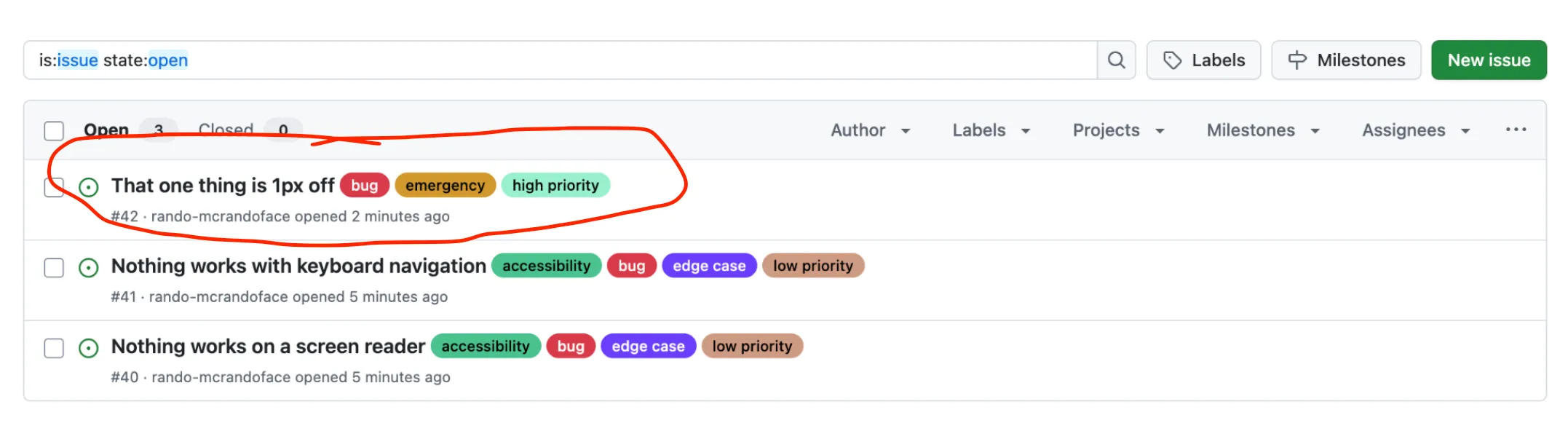
Accessibility and related UX issues, while forgotten or ignored, don’t go away until someone takes the time to address them. But who is responsible for accessibility? The short answer… everyone from the CEO to the intern who joined three days ago. But since this is about project backlogs, the scope will be limited to PMs, which, for the sake of this post, will consist of Project and Product Managers, Team Leads, and Scrum Masters. As the PM, it’s not necessary for them to be accessibility experts in order to manage a product’s backlog; however, if they want to level up, there are resources to help get the ball rolling.
Managing tech debt
Let’s assume there are UX and accessibility tickets in the backlog. PMs are no strangers to tech debt or having a backlog, that’s not the issue. The issue seems to lie with accepting accessibility and UX issues as bugs and how to manage them without disrupting the current roadmap. Unless there are explicit directions to fix all the accessibility issues in a set amount of time, such as a judgment from an accessibility lawsuit, well then… plan accordingly. However, if that’s not the case, don’t panic and assume all the tickets in the backlog have to be completed at once or in the same sprint; that’s not realistic. Just like any other ticket in the sprint, the level of effort will vary. The team can discuss the tickets, assign story points, and begin assigning them to upcoming sprints. The first step would be to validate those tickets. If they reference an issue that’s no longer valid, great! Close it out. However, for valid tickets, prioritize them by severity and have them ready to discuss at the next sprint planning.
Cool, but what does “Severity” look like?
Severity rankings
Severity is a scale that is determined by the negative impact it has on a person’s ability to complete a particular task. This can range from how a person interacts with the product to how they perceive the user interface or a combination of the two. Typically, the scale is defined using the following rankings: “Critical”, “Serious, “ and “Moderate”. It’s important to note that severity is not an indicator of the level of effort to remediate accessibility issues.
Critical
Critical issues are blockers that prevent a person from completing a task or function without requiring additional outside help. An example of this would be the lack of keyboard support for a person with mobility issues or a power user. If a person is able to add a product to their cart using the mouse, they should also be able to do the same thing using only their keyboard.
Serious
Serious issues do not block a person’s ability to complete a task or function, but can cause significant friction and negatively impact the person’s experience. An example of this would be a poorly designed form. If a person is required to fill out a form, but each of the text inputs is missing a visible label that identifies the purpose of the text input, this can result in the person making errors. Also, if error states are not associated with the correct text input or provide information on how to correct the error, this results in an increase of cognitive load, which impacts the experience.
Moderate
Moderate issues do not block the person’s ability to complete a task or function, but they can impact the efficiency of the experience. An example of this would be poorly written HTML that prevents a person from being able to understand how the content is structured. Another example would be poorly designed links that make it difficult for the person to tell the difference between the links and body copy.
Going forward
To help stay on track and establish good habits, make accessibility reviews and testing a part of the acceptance criteria for new design, content, and development tickets. This will help promote the concept of shifting left. What this means is that accessibility is moved to the beginning of the product development lifecycle and is included in each phase instead of being considered after the work has been completed or not at all. This allows for better-informed decisions to help mitigate possible accessibility issues before the code ships. It also allows the PM to manage timelines and set the correct expectations when establishing a sprint.

The important thing to remember, especially when there’s a ticket with high story points, is that it takes discipline to resist the urge to say, “We’ll fix it later,” which would lead to the perpetuation of digital ableism and the use of virtual disappointment rooms.